welcome-msg
This command configures a banner message, which is displayed when you connect to the device's management interfaces (Web and CLI).
Syntax
(config-system)# welcome-msg <Index>
(welcome-msg-<Index>)# text <Message>
|
Command |
Description |
|---|---|
|
Index |
Defines the table row index. |
|
text <Message> |
Defines the message (string) for the row. |
|
display |
Displays the banner message. |
Command Mode
Privileged User
Note
| ■ | The message string must not contain spaces between characters. Use hyphens to separate words. |
| ■ | The location of the displayed message depends on how you access the device: |
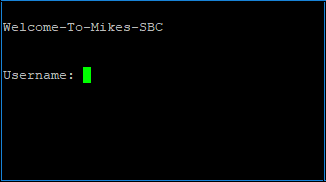
| ● | Web interface or Telnet CLI: The message is displayed before you enter your login username, as shown in the following example for Telnet: |
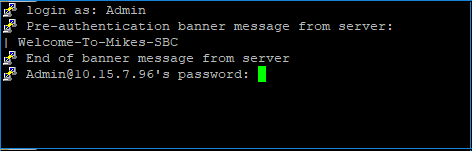
| ● | SSH CLI: The message is displayed after you enter your login username (before the login password prompt), as shown in the following example: |
Example
| ■ | This example configures a banner message: |
(config-system)# welcome-msg 0
(welcome-msg-0)# text Hello-World-of-SBC
(welcome-msg-0)# activate
(welcome-msg-0)# exit
(config-system)# welcome-msg 1
(welcome-msg-1)# text Configure-Me
(welcome-msg-1)# activate
| ■ | This example displays the message: |
(config-system)# welcome-msg display
welcome-msg 0
  text "Hello-World-of-SBC"
welcome-msg 1
  text "Configure-Me"
| ■ | The message is displayed when you connect to the device's management interface: |
Hello-World-of-SBC
Configure-Me
Username: Admin